Embroidery Mockup: A Designer's Review for Personalized Gifts
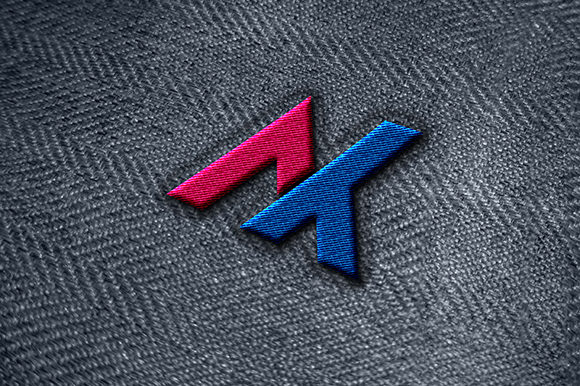
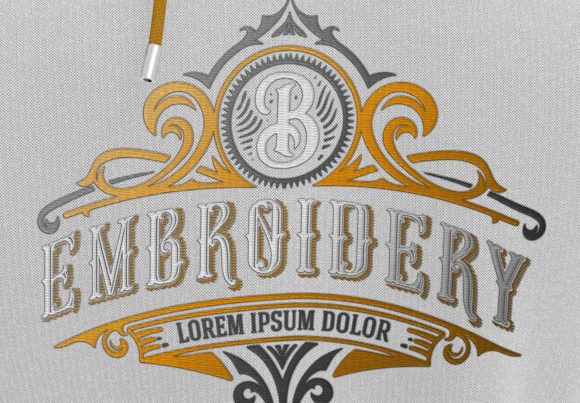
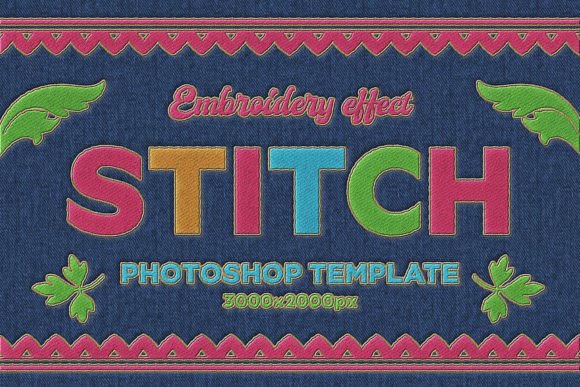
As someone who has spent years digitizing and stitching machine embroidery designs for a small personalized gift shop, I know how critical it is to preview a finished product before it reaches the customer. When I first opened the Embroidery Mockup, I immediately felt a sense of relief. This is not just another flat placeholder — it’s a high-quality Photoshop template that lets you see how your embroidery file will look on real products. With a resolution of 3000x2000 pixels at 300 dpi, the clarity is impressive. I could zoom in and check thread colors, stitch density, and even the way light hits the fabric texture.
The mockup belongs to the Layer Styles and Graphics category, and it shows. The layering is intuitive, allowing me to swap in my own custom embroidery designs and adjust the effect as if I were hooping fabric. For a shop owner juggling baby embroidery, wedding gifts, and custom orders, this tool saves time and builds trust with buyers.
First Impression: Warm, Elegant, and Handmade
When I dropped my first design into the Embroidery Mockup, the mood was exactly what I aim for: sweet yet refined. The satin stitch simulation looked plush, and the slight fabric texture gave the preview a tactile feel. It’s not overly cartoonish or sterile — it has a handmade quality that appeals to crafters and Etsy sellers. The mockup works beautifully for romantic wedding keepsakes, classic nursery items, and modern personalized towels. The charm comes from the realistic lighting, which makes the embroidery pop without looking artificial.
For a baby blanket design, the mockup conveyed softness. For a monogrammed apron, it felt sturdy and professional. The emotional pull is strong — customers can imagine the finished product in their hands, which increases perceived value. Whether your style is playful or elegant, the Embroidery Mockup adapts because the Layer Styles allow you to tweak the depth and sheen of the stitches.
Where Embroidery Mockup Shines for Personalized Products
I tested the mockup across several gift categories that my shop regularly handles. Here are the standout uses:
- Baby embroidery: Baby blankets, onesies, and nursery decor look adorable. The mockup handles small lettering well, but I recommend checking stitch density first.
- Wedding gifts: Personalized towels, pillow covers, and keepsake boxes. The elegant sheen of the simulated thread gives a high-end finish.
- Family keepsakes: Embroidered towels and tote bags with names or dates. The fabric texture in the mockup feels like quality cotton or linen.
- Custom home decor: Pillow covers, aprons, and blankets. The mockup shows how the design lies on curved surfaces and folds.
- Etsy listings and product photography: Use the mockup to create consistent, professional previews. It beats stitching a sample for every photo.
The Embroidery Mockup also works as a printable mockup for customer approval. I send a screenshot to buyers before stitching, which reduces returns. For small shop product development, it’s invaluable.
When to Use Care with This Mockup (and the Real Embroidery)
No mockup is perfect. I learned to watch for these situations where the template might not fully represent real-world challenges:
- Small lettering: The mockup can make tiny text look crisp, but on actual fabric, it may become unreadable. Always test stitch density on scrap fabric first.
- Delicate details: Intricate logos with thin lines may look fine in the mockup but could break during stitching. Confirm the embroidery file is digitized for the fabric.
- Textured or stretchy fabric: The mockup shows a relatively smooth surface. For thick towels, baby clothes, or stretchy knits, adjust stabilizer and hoop size.
- Curved surfaces: Pillow covers and tote bags have curves. The mockup flattens the design slightly — check how the finished product will sit.
- Dark fabric: The mockup allows you to change background color, but real dark fabric may need underlay or white thread beneath. Compare light and dark mockups before finalizing.
- Frequent washing items: Embroidered towels and baby blankets get washed often. Use high-quality thread and proper stabilizer; the mockup won’t show wear.
Treat the Embroidery Mockup as a guide, not a guarantee. I always stitch a test sample before selling a finished product.
How Embroidery Mockup Boosts Giftability and Customer Trust
In my experience, shoppers are hesitant to buy personalized gifts online because they can’t see the final look. The Embroidery Mockup bridges that gap. When I list a custom tote bag on Etsy with a realistic mockup, engagement jumps. Customers can visualize the thread colors on the fabric, which makes the gift feel more personal and worth the price.
The perceived value increases because the mockup looks polished — almost like a professional product photo. Buyers trust that I have designed their order thoughtfully. This emotional connection is especially strong for wedding gifts and baby embroidery, where the sentiment matters as much as the product. The mockup shows the love and care in the handmade product before a single stitch is sewn.
For digital product sellers offering embroidery files, this template is a huge asset. You can preview your machine embroidery design on different items and attract more buyers. The Layer Styles let you adjust the design’s appearance without re-digitizing.
Practical Embroidery Notes From My Test Stitches
I’ve stitched out several designs after using the Embroidery Mockup. Here are real lessons I learned:
- Test on scrap fabric first. The mockup might look perfect, but each fabric behaves differently. Use the same fabric type your customer chose.
- Check thread color contrast. The mockup simulates contrast well, but real lighting varies. Compare the mockup to your actual thread spools.
- Confirm hoop size. The mockup doesn’t show hoop marks. Make sure your embroidery file fits your hoop with room for stabilizer.
- Review stitch density. High density can cause puckering on lightweight fabrics. The mockup won’t warn you — you need to inspect the digitized file.
- Use proper stabilizer. For towels or stretchy items, use tear-away or cut-away stabilizer. The mockup gives no clues, so plan accordingly.
- Compare light and dark fabric mockups. I create two versions of the mockup — one light, one dark — to ensure the design works on both.
- Check small details after stitching. Tiny letters that looked fine in the mockup can become blobs. Adjust your embroidery file if needed.
- Review commercial licensing. If you sell finished products using this mockup, confirm the license terms. The product description did not specify, so contact the creator before selling.
The Embroidery Mockup has become a staple in my workflow. It saves me from stitching samples for every inquiry and helps customers say “yes” faster. For any embroidery maker, gift shop owner, or Etsy seller, this template is a smart investment. Just remember: a mockup is a powerful preview, but the real magic happens when you hoop the fabric and let the machine bring the design to life.