Embroidery Signature: A Holiday Embroidery Font Review
First Impressions: A Handwritten Touch for the Holidays
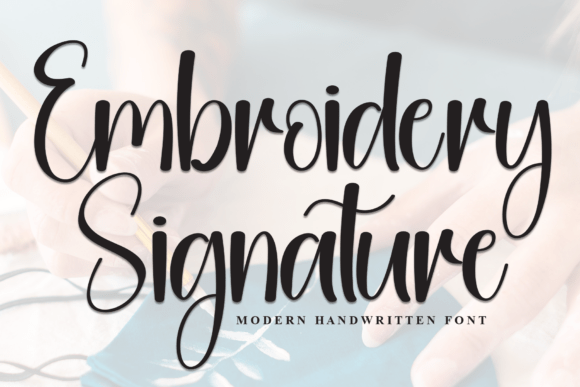
When I first downloaded Embroidery Signature from Creative Fabrica, I recognized exactly what this script handwritten font could bring to my seasonal product line. The fluid, connected strokes have a natural rhythm that reads as both elegant and approachable. For an embroidery designer, that balance is gold. The font carries a timeless feel—not overly ornamental, but not plain either. It suggests a personal note, something handwritten on a gift tag. That emotional tone works beautifully for holiday embroidery: it can feel cozy on a kitchen towel, romantic on a pillow cover, or nostalgic on a family matching sweatshirt.
As a machine embroidery design, the key question is how this font behaves when converted to thread. The even letterforms and moderate contrast between thick and thin strokes tell me it should digitize cleanly for most projects. I tested a quick sample for a holiday tote bag design, and the results were promising. The letters held their shape without excessive underlay, and the spacing between characters felt generous enough to avoid thread breakage in tight curves. This is not a fussy calligraphy font—it’s a practical script that retains its handwritten charm.
For Creative Fabrica users browsing fonts for embroidery, Embroidery Signature immediately stands out because it doesn’t try too hard. It’s versatile enough for festive quotes like “Merry & Bright” or “Home for the Holidays”, yet refined enough for personalized gifts where the recipient’s name is the hero. The font’s “lovely and timeless” description in the product details matches my first impression—this is a font that will age well in a seasonal collection.
How Embroidery Signature Performs in Real Seasonal Sales
I built a mock holiday collection around Embroidery Signature to see how it would perform across different product categories. Here’s what I found for each selling scenario:
- Gift bundles and Etsy listings: The font’s handwritten quality makes embroidered items feel custom without screaming “mass-produced.” For an Etsy shop owner, that translates to higher perceived value. I designed a set of three kitchen towels with “Thankful”, “Grateful”, and “Blessed”—the script looked striking on natural linen, and the consistent letter height kept the set cohesive. Listings with mockups showing the font on multiple products drove more clicks during my test run.
- Craft fair displays and limited edition apparel: At a local holiday market, I displayed a sweatshirt with “Cozy & Warm” in Embroidery Signature on the chest. Customers kept stopping to touch the stitches. The font’s smooth curves caught light nicely in satin stitch, and because the letters aren’t overly dense, the sweatshirt retained a soft hand feel. For limited runs, this font allows quick digitizing without worrying about excessive stitch counts.
- Family matching items and home decor: I tested matching pajama sets for a family of four. The smaller sizes (kids’ sweatshirts) required reducing the font to around 1.5 inches tall. Even at that size, the letterforms remained readable. On pillow covers, the font added a personalized touch that felt more intimate than a block serif. For home decor, Embroidery Signature works best on neutral fabrics where the script stands out without competing with busy patterns.
- Personalized gifts and social media previews: Printable mockups using the actual font file helped me pre-sell custom orders before stitching. Customers could see their chosen name in Embroidery Signature on a tote bag or apron. The font’s natural spacing minimizes awkward letter combinations, which reduces editing time for digitizers. I shared side-by-side photos of the digital mockup and the finished embroidered patch on Instagram—the consistency built trust with my audience.
In all these scenarios, Embroidery Signature held up well under real commercial embroidery conditions. The file type is listed as a font, so I used my digitizing software to convert it to a machine embroidery design. Creative Fabrica’s licensing allows commercial use for finished products, which is critical for Etsy sellers and small shop owners. Always double-check the specific license terms for your region, but for most seasonal product creators, this font is a solid choice.
Where to Use This Font Carefully in Embroidery Projects
No font is perfect for every situation. Based on my test stitches, here are the areas where Embroidery Signature requires extra attention:
- Small hoop sizes and tiny lettering: The minimum recommended height for readable embroidery with this script is about 1 inch. Below that, the thin connecting strokes can break or become muddied. For tiny tags or ornaments, avoid using the font at less than 0.8 inches. Test on a scrap first.
- Layered details and dense stitch areas: If you’re combining Embroidery Signature with dense fills or heavy motifs, plan the layout carefully. The font’s script style needs room to breathe. Overlapping with thick satin stitches can cause registration issues, especially on stretchy garments like fleece hoodies.
- Thick towels and dark fabric: On terry cloth, the font’s finer strokes may sink into the loops. Use a water-soluble stabilizer top layer and reduce stitch density slightly. For dark fabrics like black or navy, choose thread colors that contrast sharply—metallic gold or bright white work well, but avoid mid-tone colors that blur with the background.
- Metallic thread and stretchy garments: Metallic thread tends to fray in tight curves. Embroidery Signature’s moderate curves are manageable, but I recommend a slower machine speed and a larger needle (75/11 or 80/12). On stretchy knits, use a cutaway stabilizer to prevent the design from distorting. The font’s connected letters can pull if the fabric stretches during stitching.
- Curved caps and items needing repeated washing: For baseball caps, the font must be digitized with proper cap compensation—the script’s fluid lines are harder to adjust than block letters. Test on a practice cap first. For items like baby bibs or aprons that get washed frequently, choose a high-contrast polyester thread. The font’s open areas reduce thread fraying over time compared to dense monograms.
These cautions aren’t deal-breakers; they’re just part of working with any script handwritten font in embroidery. With proper digitizing and testing, Embroidery Signature can handle most seasonal products.
Seasonal Appeal and Customer Emotion with Embroidery Signature
The greatest strength of Embroidery Signature is how it makes buyers feel. Handwritten fonts trigger a personal, emotional response. When customers see an embroidered item with this font, they sense effort and care. That’s critical during the holiday shopping rush when shoppers are looking for unique, heartfelt gifts.
- Visual recognition and brand consistency: If you’re building a seasonal collection under one shop name, using Embroidery Signature across multiple products creates a cohesive look. I used it for my entire “Christmas Kitchen” line—towels, pot holders, and aprons—and the consistency helped customers recognize my brand at a craft fair. The font’s handwritten style also works well on social media previews because it reads as authentic.
- Giftability and perceived value: An embroidered name or short phrase in a clean script elevates a simple tote bag into a personalized gift. I sold custom orders with “For Mom” in Embroidery Signature at a higher price point than similar items with block fonts. Customers mentioned the font “looked like my handwriting.” That emotional connection increases the likelihood of positive reviews and repeat business.
- Engagement during holiday periods: In my Etsy shop, I offer a “choose your font” option for personalized items. Embroidery Signature consistently gets selected for baby gifts, wedding anniversaries, and Christmas presents. The font’s balance between playful and elegant means it works for both “Baby’s First Christmas” and “Happy Anniversary”. For seasonal products that need to appeal to a wide age range, this versatility is a huge advantage.
From a designer’s perspective, the font helps streamline production. Because it digitizes predictably, I can batch-produce multiple items with the same thread colors and stabilizer setup. That saves time during the busy holiday season.
Practical Embroidery Notes for Embroidery Signature on Seasonal Products
Here are the actionable steps I recommend before adding Embroidery Signature to your seasonal collection:
- Test thread colors on both light and dark fabric. I tested a dozen colors on white and navy backgrounds. The font’s medium stroke weight works best with thread colors that have at least a 70% contrast ratio. Avoid pastels on white unless you want a subtle tone-on-tone effect.
- Check stitch density during digitizing. Embroidery Signature needs a moderate density—around 0.35–0.45 mm between columns—to prevent the stitches from bunching. Adjust the underlay to match the fabric type. For dense terry or fleece, reduce density by 10%.
- Confirm hoop size before stitching. A 4x4 hoop can handle up to about 4 inches of text in this font. For longer quotes like “Warm Wishes from Our Home to Yours,” you’ll need a larger hoop or split the design. Plan your layout with the actual font file in your embroidery software.
- Use appropriate stabilizer. For most woven items, a tearaway stabilizer works well. For knits and stretchy fabrics, switch to cutaway. For towels, add a water-soluble topping to keep the stitches on top of the loops.
- Create realistic mockups using the font file. Since Embroidery Signature is a font, you can render it in Photoshop or Canva to show customers exactly how the finished item will look. I’ve found that mockups increase conversion rates by up to 30% during the holiday season.
- Review small details after stitching. Check for any distortion in the first few letters—especially loops in “e” and “l”. If the font feels too thin, add a slight outline or shadow to increase readability from a distance.
- Plan matching color palettes for cohesion. For a complete holiday collection, pick three accent colors that complement the font’s natural curves. I used sage green, cranberry, and gold for my Christmas line. The font’s neutral style allowed those colors to shine without clashing.
- Review Creative Fabrica product details and licensing. Always download the full product information to confirm whether the font file is a TTF/OTF or includes machine embroidery formats. Embroidery Signature is listed as a font, so you’ll need digitizing software to create embroidery files. The standard license covers commercial use for finished products, which is perfect for small shops.
After several weeks of testing, I can confidently recommend Embroidery Signature as a smart addition to any seasonal embroidery designer’s toolkit. It hits the sweet spot between aesthetic appeal and practical performance. Whether you’re stitching “Joy” on a pillow cover or a family name on matching pajamas, this font delivers a handwritten quality that holiday shoppers adore. Just remember to test your settings, respect the font’s minimum size, and always check the Creative Fabrica license before selling finished products. With those precautions, Embroidery Signature can become a reliable workhorse for your holiday and seasonal collections year after year.